
Reviewed · NEW YORK CITY TOURS
NYC: See Yourself on a Times Square Billboard for 24 Hours
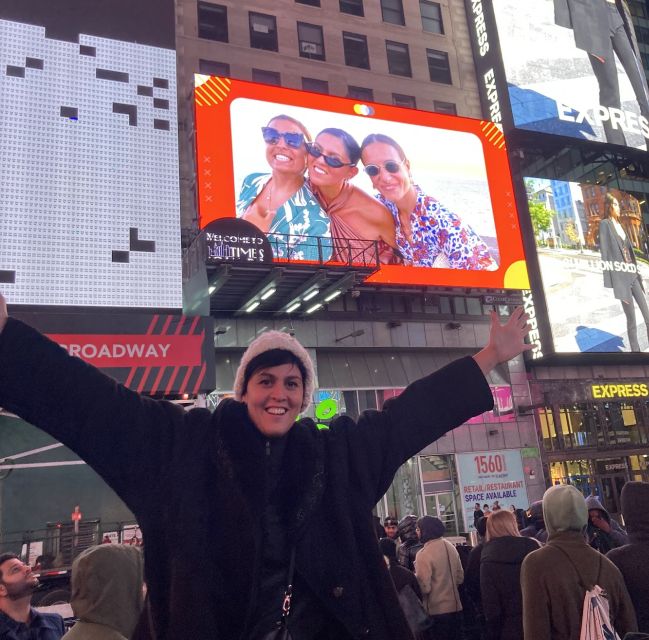
A family photo, birthday tribute, engagement picture, or marriage proposal can suddenly fill a giant screen above Broadway. This Times Square experience gives you 15 seconds of billboard fame every hour for 24 hours, so you can watch it in person, send the live stream to people at home, and return later for another look.
I like the easy upload process and the generous group option: one ticket covers a single image with any number of people in it. I also like the repeat showings, since 15 seconds passes quickly and Times Square is too crowded to count on seeing it at the first attempt.
The main catch is timing. Your picture appears for only 15 seconds, and an early slot can begin at an awkward hour, sometimes around 1 a.m. You must upload your file promptly because your place is not held until the submission is complete.
In This Review
- Key points to know before you book
- What this Times Square billboard experience really is
- Finding the screen at 1560 Broadway
- How the 15-second hourly schedule works
- Choosing a group photo, individual images, or a video
- Upload rules that can make or break the surprise
- Seeing it in person versus watching online
- How much value do you get for $150?
- Who will enjoy this most
- A practical plan for your display day
- Should you book the Times Square billboard?
- FAQ
- Where is the Times Square billboard located?
- How long does the photo or video appear?
- How many showings are guaranteed?
- Can one ticket cover a group photo?
- Do I need separate tickets for individual photos?
- Can I add a message to the display?
- Can friends and family watch from home?
- What content is not allowed?
- Can I change my uploaded photo or video?
Key points to know before you book
- One image can include your whole group: There is no stated limit to the number of people in a single photo.
- Your display repeats hourly: You receive 15 seconds every hour for 24 hours, with at least 22 guaranteed showings if technical trouble occurs.
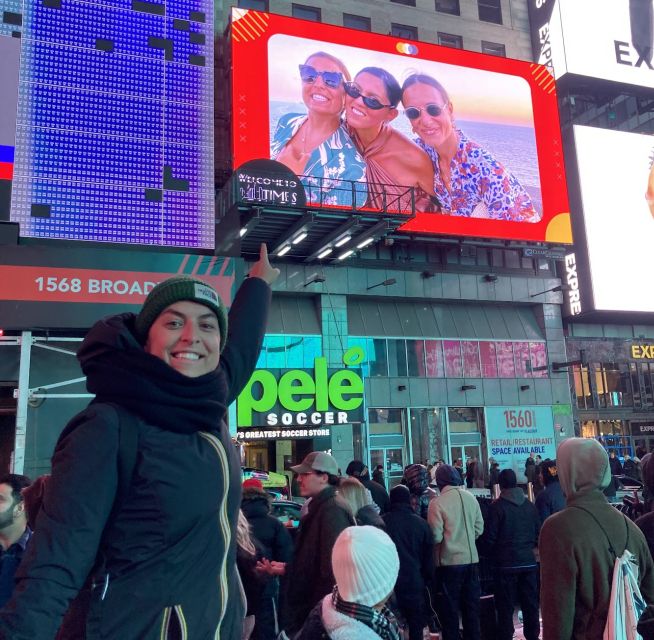
- The location is easy to identify once you reach it: Find the screen at 1560 Broadway, above the Pelé store and opposite the TKTS red steps.
- You can add a personal message: A custom frame and a short line of text are included.
- The live stream extends the moment beyond New York: Friends and family can watch online from anywhere.
- File rules matter: Watermarks, logos, QR codes, links, nudity, smoking, vulgarity, and advertising-style material are not accepted.
What this Times Square billboard experience really is
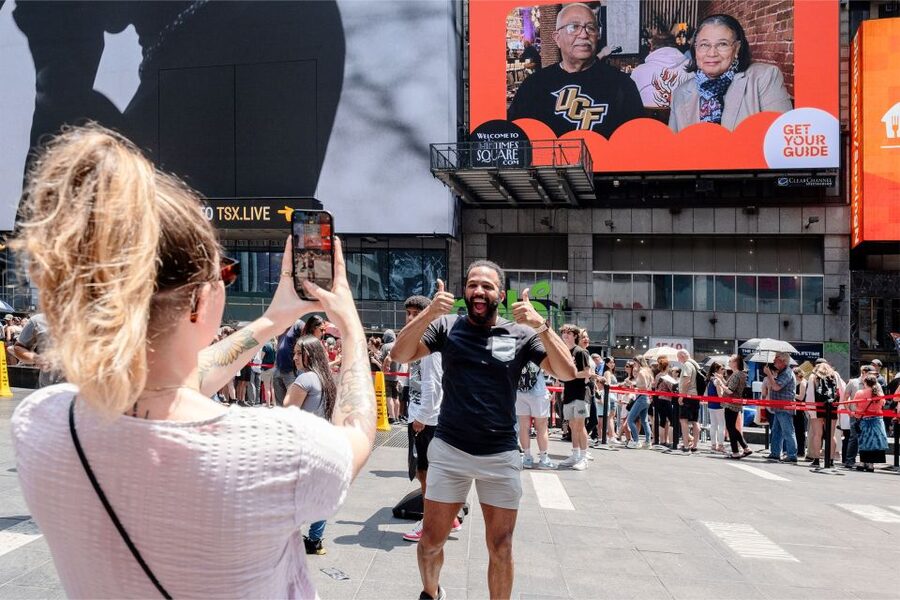
This is not a guided tour with a route, commentary, or scheduled sightseeing stops. It is a one-day digital display booking that lets you place your own photo or short video on a large screen in central Times Square.
You choose a date, buy the experience, and use the code supplied after purchase to upload your file. Once the upload is accepted, you receive your assigned display time within 24 hours. Your image then appears for 15 seconds each hour across the following 24-hour period.
That format makes the experience flexible. You can plan to be in Times Square for one showing, then go about your day knowing the image will return later. If your friends or relatives cannot join you in New York, they can watch through the online live stream.
I would think of it as a special-event add-on rather than a full-day activity. The booking lasts 24 hours, but your actual viewing time is brief. The value comes from the surprise, the setting, and the repeated chances to catch it.
Other New York City days travellers line up against this one:
- NYC: SUMMIT One Vanderbilt Tickets
★ 4.7 · 51,195 reviews - NYC: 9/11 Memorial & Museum Timed-Entry Ticket
★ 4.8 · 31,428 reviews - NYC: Empire State Building Tickets – Observatory & Museum
★ 4.7 · 25,757 reviews
Finding the screen at 1560 Broadway
The billboard is at 1560 Broadway between 46th and 47th Streets. It is above the Pelé store, directly across from the famous TKTS red steps.
That exact location matters. Times Square is a wall of screens, signs, shops, and tall buildings, and first-time visitors can easily walk past the right place while looking upward. One useful approach is to head to the TKTS red steps first, then look across Broadway for the Pelé store and the screen above it.
Some people have found the spot difficult to locate in the crowded square, and map apps can be less helpful among tall buildings. Give yourself extra time before your assigned showing. Once you find the screen, it is accessible from Broadway and offers a clear place to wait and take a picture.
The area is crowded, especially around the red steps. You may need to stand to one side, keep your phone ready, and watch the screen closely. The screen itself is easy to see once you are in the correct position, but the surrounding signs can make it hard to focus on one display.
How the 15-second hourly schedule works
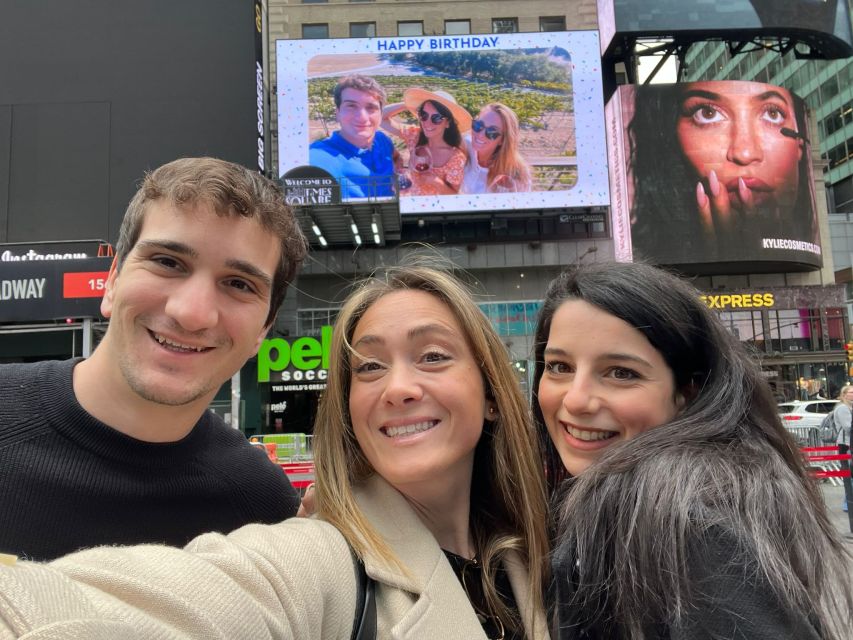
Your photo or video appears for 15 seconds every hour over 24 hours. That sounds generous until you are standing in Times Square, where a quarter-minute can vanish quickly.
Your confirmation gives you a specific time slot, often identified by the minute within the hour. Arrive early and watch from just before that point. If your slot is at 11:21, for example, do not arrive at 11:21 and expect plenty of time to get settled.
The repeated schedule is the strongest practical feature. You can watch once in the daytime, again after dark, and perhaps a third time if you are nearby. Several people have chosen to wait for more than one showing so they could take better photographs or share the moment with everyone in their group.
You are guaranteed 22 showings within the 24-hour period in case of technical difficulties. That is useful reassurance, though I would still treat the first assigned appearance as the main event. If you are planning a birthday surprise, leave room for a missed viewing rather than building your entire day around one 15-second window.
Pay close attention to the date and time zone in your confirmation. One booking had conflicting dates between the voucher and email, which created confusion. Another person pointed out that New York time can differ from the time at home, especially for people arriving from another US region.
An especially early first showing can begin at 1 a.m. If you want to see the very first appearance, check the start time before making plans. A late-night slot may be fine for a celebration in Times Square, but it is not ideal after a long day of sightseeing or for young children.
Choosing a group photo, individual images, or a video
One ticket covers one uploaded photo or video. If you want the entire group in one picture, a single ticket is enough, and there is no stated cap on the number of people who can appear in that image.
That is the best-value choice for a family portrait, wedding party, birthday group, or friends traveling together. A carefully designed collage can also work well. One family used six pictures in a collage and found that the screen was large enough for each image to remain clear.
If each person wants a separate picture or video, you need one ticket per individual upload. That costs more, but it gives each person a separate moment on the screen rather than asking everyone to share one frame.
A photo is the simplest option. It is easy to prepare, and a strong group image can be recognized quickly during its short showing. A short video gives you movement, but keep it visually clear and avoid relying on a long spoken message that could be missed.
You can include one custom frame per photo. Available styles range from a standard design to messages for birthdays, congratulations, and marriage proposals. You can also add a short line of text within the photo or video.
Keep the design simple. Times Square already supplies plenty of visual noise, so a crowded image with tiny lettering may not read well from street level. Use a clear face, a bold composition, and a short message that can be understood in a glance.
A completely different way to spend a day nearby:
- NYC: Empire State Building Observation Deck Tickets
★ 4.7 · 22,072 reviews - NYC: Edge Observation Deck Admission Ticket
★ 4.6 · 20,918 reviews - New York City: Statue of Liberty & Ellis Island with Ferry
★ 4.6 · 18,683 reviews - New York City: American Museum of Natural History Ticket
★ 4.5 · 15,447 reviews
Upload rules that can make or break the surprise
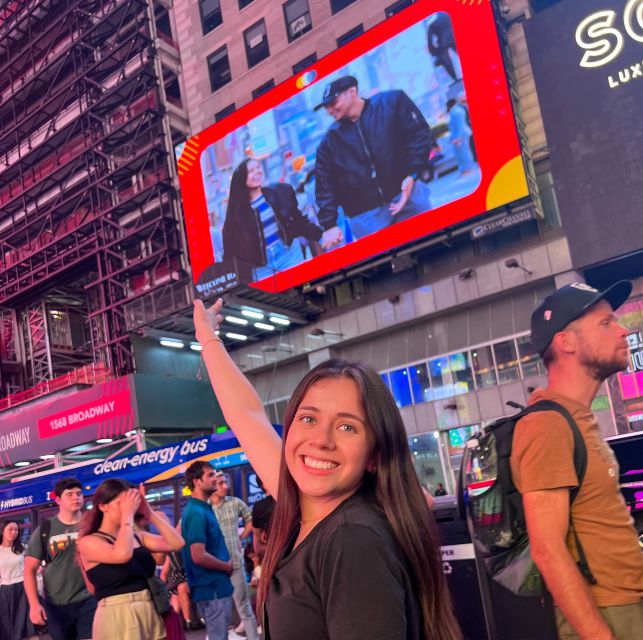
You receive a code immediately after purchase and use it to upload your photo or video. Your slot is not reserved until the file is submitted, so do not wait until the last minute.
You can change the file if the request is made at least 24 hours before the display date and the original file has not yet appeared. That gives you a useful safety net if you select the wrong image, as one person discovered with a video. Still, I would check the final file carefully before submitting it.
The content rules are strict. Files may not contain:
- Watermarks
- Brands or logos
- Nudity
- Smoking
- Vulgarity
- QR codes
- Links
- Advertising-style material
- Social media links for independent professionals or freelancers
A personal birthday message is fine, but this is not a way to place a commercial advertisement on the screen. A logo or web address that looks promotional can be declined.
For a surprise, upload the image yourself and keep the assigned date and time private. If the person you are surprising is already watching the Times Square live stream, the secret may disappear quickly.
Seeing it in person versus watching online
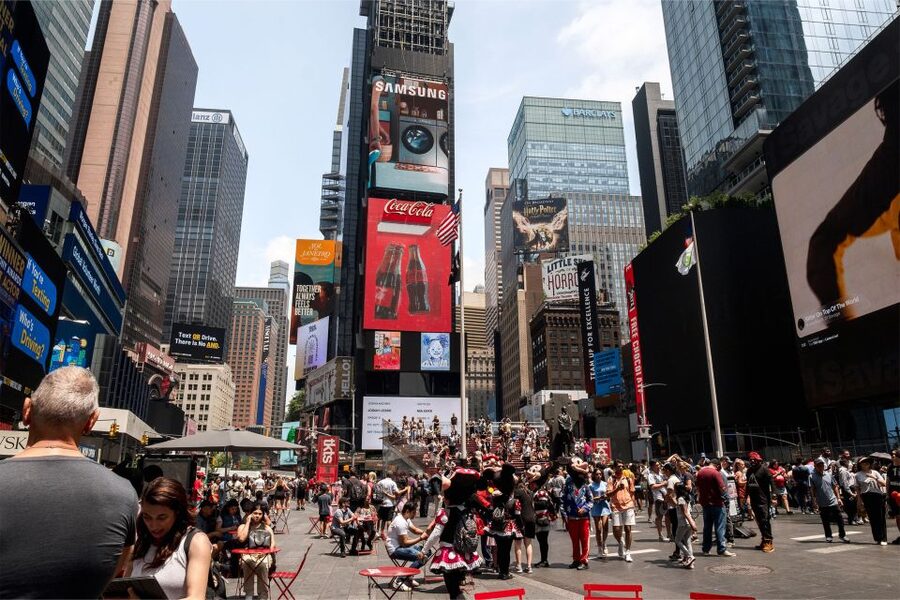
Seeing the display in Times Square is the more powerful version. The setting gives the image its meaning: your family picture is no longer just on a phone, but high above one of the best-known public squares in New York.
Still, street viewing has practical limits. You may have to wait in a packed area, and you can miss the 15-second appearance if you are looking at another screen or trying to move through the crowd. Keep your camera pointed toward the billboard before the scheduled minute and ask someone in your group to record while another person watches.
The online live stream is a valuable second option. Send the link and display time to family and friends before the showing. They can share the surprise even if they are thousands of miles away.
The stream may not always look as good as being there. Glare has made the picture difficult to see at times, particularly online. One tribute looked better in person than through the camera feed. I would treat the stream as a handy extra, not a replacement for standing beneath the screen.
For the best result, use the live stream to include people who cannot attend, then take your own video in Times Square. You get both the emotional reaction from the audience at home and the atmosphere of the square itself.
How much value do you get for $150?
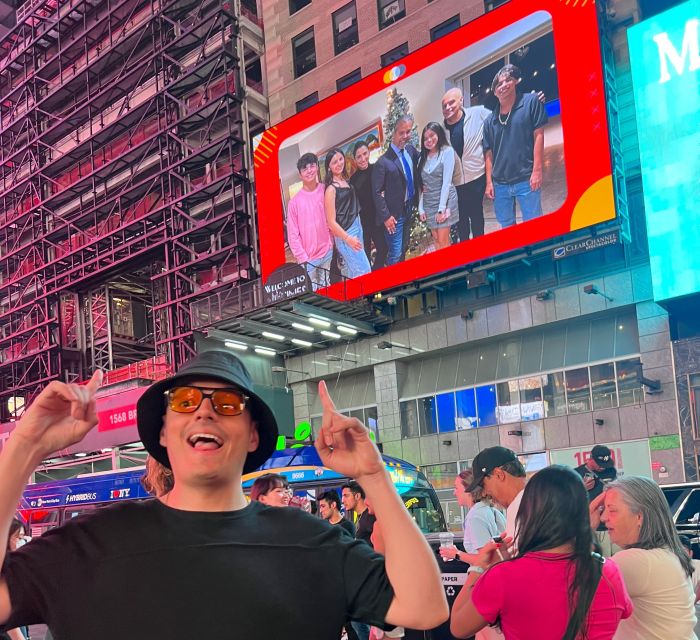
At $150 per person, this is not a cheap sightseeing stop. You are paying for a highly specific public display, not transportation, a guide, a meal, or entry to a museum.
The price makes more sense for an occasion than for an ordinary afternoon. A 16th birthday, 40th birthday, 50th birthday, engagement, anniversary, marriage proposal, or family tribute can justify the cost because the screen becomes part of the celebration.
The group-photo rule improves the value. If a family shares one picture, one ticket covers the entire image. Buying separate tickets for each person can quickly become expensive, so decide first if you want a shared group moment or several individual appearances.
The 24-hour repeat schedule also helps. You are not paying for one 15-second showing only. You receive many chances to see it, and the display can be viewed in daylight and after dark. That said, the extra showings do not turn this into a full-day attraction. The emotional value is concentrated in the moment you first see the image.
I would compare the cost with other special-occasion expenses in your New York plans. If you are already spending on a birthday dinner, show, or professional photographs, this can be a memorable centerpiece. If you simply want to see your face on a screen for fun, the price may feel steep.
Who will enjoy this most
I would recommend it most for families with children and teenagers. A child seeing their own face in Times Square can make a birthday feel genuinely different, and the repeated appearances make it easier to arrange a viewing around naps, meals, and sightseeing.
It also works well for romantic surprises. An engagement photograph, anniversary image, or proposal message has an instantly recognizable setting. Just make sure the person you want to surprise is in the right place at the right time.
It suits long-distance celebrations, too. A parent can honor a child, a family can remember someone who has died, or friends can send a message to people at home through the live stream.
I would be less keen on it for a traveler who wants a structured New York experience. There is no guide, narration, transport, or tour route. If you want to learn about Times Square, pair this with a walking tour or explore the square separately.
The billboard and street area are wheelchair accessible from Broadway. The crowded setting can still require patience and careful positioning, but there is no stated barrier to reaching the viewing location.
A practical plan for your display day
After booking, submit your image or video right away. Check the date, the assigned time, the time zone, and the spelling of your message before you finalize it.
Share the live-stream details with family before the show. Tell them to open the link a few minutes early, since the image lasts only 15 seconds.
On the day, visit the billboard location ahead of time. Find the TKTS red steps, identify the Pelé store across the street, and confirm the screen above it. This removes the most common source of stress.
Arrive several minutes before the scheduled minute. Keep your phone charged, set it to record, and assign one person to watch the screen while another films the reaction. If you miss the first showing, do not panic. Your image should return hourly, with at least 22 showings guaranteed in case of technical problems.
If your first showing falls very late at night, decide if seeing it immediately is worth losing sleep. You can watch it at a more sensible hour during the 24-hour period and still share the live stream with people at home.
Free cancellation is available up to 24 hours before the experience for a full refund, and you can reserve now and pay later. Those options help if your New York schedule is still shifting, but they do not remove the need to submit the file on time.
Should you book the Times Square billboard?
Book it if you want a short, highly personal New York spectacle tied to a real occasion. The easy upload, repeated hourly displays, central location, custom frame, and online stream give you several ways to share the moment.
I would book one ticket for a group image whenever possible. Pay for separate tickets only when individual photos are important. Prepare a clear file, arrive early, and plan to watch more than once.
Skip it if you expect a conventional tour or if $150 feels too high for a brief display. But for a child’s birthday, a milestone celebration, or a surprise shared across continents, this can create the kind of New York memory that a standard photo stop cannot match.
FAQ
Where is the Times Square billboard located?
The billboard is at 1560 Broadway between 46th and 47th Streets. It is above the Pelé store and directly across from the TKTS red steps.
How long does the photo or video appear?
Your photo or video appears for 15 seconds every hour for 24 hours on the selected date.
How many showings are guaranteed?
You are guaranteed 22 showings within the 24-hour period in case technical difficulties affect the schedule.
Can one ticket cover a group photo?
Yes. One ticket covers one photo or video, and there is no stated limit on the number of people who can appear in a single group image.
Do I need separate tickets for individual photos?
Yes. If each person wants a separate photo or video, you need one ticket for each individual upload.
Can I add a message to the display?
Yes. The experience includes one custom frame per photo and a short line of text within your photo or video. Available frame messages include birthday, congratulations, and marriage proposal options.
Can friends and family watch from home?
Yes. You can share the online live stream and your assigned time slot with friends and family around the world.
What content is not allowed?
Files may not include watermarks, brands, logos, nudity, smoking, vulgarity, QR codes, links, or advertising-style material. Social media links from independent professionals or freelancers are also declined.
Can I change my uploaded photo or video?
You can change it if the request is made at least 24 hours before the display date and the original photo or video has not yet appeared on the billboard. Your slot is not reserved until you submit a file.
Recently reviewed around New York City
- Dyker Heights Christmas Lights Guided Tour★ 4.5 · 920 reviews
- New York City Dinner Cruise with Live Music★ 4.0 · 377 reviews
- New York City Holiday Lights Tour★ 4.5 · 664 reviews
- NYC in a Day Tour: Statue of Liberty, Times Square and More★ 5.0 · 366 reviews
- Broadway and Times Square Insider Tour with Theater Professional★ 5.0 · 651 reviews
- NYC Central Park Bicycle Rentals★ 4.5 · 368 reviews
- Central Park Bike Rental New York City★ 4.0 · 560 reviews
- Museum of Ice Cream New York City Admission Ticket★ 4.0 · 1,154 reviews
New York City Tours, compared.


Empire State Building Tickets – Observatory & Museum
Read our review →
Empire State Building Observation Deck Tickets
Read our review →


Browse the lists this tour appears in